Even though I love reading, I often start books and then lose track of them a few pages in when I get busy with some other task or distraction. It never seems like I have enough time in a day to squeeze in reading.
So instead I squeeze in audiobooks. I borrow them from my library and listen to them while I clean the house, drive to and from places, or while I do other things online.
My library offers audiobooks in four formats: books on cassette tape (these are phasing out since most people do mp3 players now instead of tapes), books on CD, "Playaways" -- a kind of pre-loaded mp3 audiobook about the size of an mp3 player, and electronic audiobooks which I can download through my library website. Not all libraries offer those, but many do.
You can also buy audiobooks at booksellers, or through itunes or other online audio vendors. Audiobooks on CD are expensive, often double the price of a book, but digital audiobooks cost about as much as the print version -- $10-$20.
There are also sites online that offer free audio versions of public domain books read by volunteers. A simple google search will pull up several options, but I've used Librivox.com and like it, especially since it offers several versions of the same works.
The only word of caution I can offer is while most audiobooks are done by excellent readers, some voices may not sit well with you. I chose a book early on in my new hobby that was read by a celebrity reader. The voice was so grating I could not get very far into the story. And with the free services, not all volunteer readers are equal. Try a different story, or start with books read by actors whose voices you know and like.
The nice thing about audiobooks is they can be shared by more than one person at once. A long road trip or just family night can become an event with good memories for everyone.
I'm in a friendly competition this year with two friends to read as many books as we can this year. We have agreed audiobooks count, so I might have a chance.
Sunday, January 18, 2009

How to organize just about everything
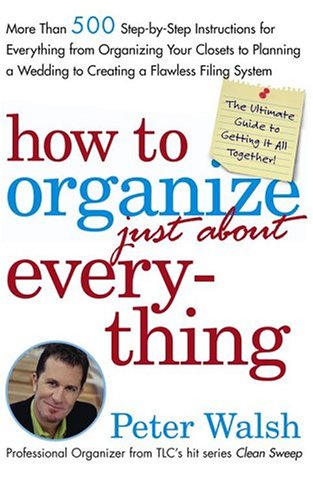 Read enough books that tell you how to organize things, and they all start to sound alike. 100 pages of photographs later and you've seen the perfect but unobtainable goal, feel even worse about your own clutter and now need chocolate.
Peter Walsh's How to Organize just about Everything (Full title: How to Organize (Just About) Everything: More Than 500 Step-by-Step Instructions for Everything from Organizing Your Closets to Planning a Wedding to Creating a Flawless Filing System) is nothing like those other books.
The cross-referenced lists give you step-by-step instructions for closet cleaning, weekly home maintenance, how to keep your car clean, or open a restaurant, or find Mr. or Mrs. Right. There are no pictures, no expectations to meet, just lots of simple, clear lists.
Don't take my word for it. Maybe it isn't the perfect book for you. But you can check it out at your local library, and then if you're like me, be sure to read list #41: Return rentals on time.
I'm really looking forward to spending more time with this book.
Thursday, January 15, 2009
iphone as life organizer
 I have been using an iphone since last summer as a personal organizer, and I highly recommend it for fellow ADD/ADHD'ers.
Admittedly it can be a HUGE distraction device. There are thousands of games -- let alone other apps -- available, and I probably spend about $10 a month trying new apps, plus looking at free ones.
With that in mind, I still say this tool is designed for distractable people in a good way, and here's why:
It's easy
(It's intuitive and cross referenced.)
When you fill in contact information, the device gives you a keypad for a phone number or buttons with [.com] for one-touch pushing for email addresses. Once you have your contacts put in, it auto links the phone field to the phone, the email address to your email, and the address field to google maps. It's so smart it's easy to use.
It's fun
(It's kinesthetic.)
Even if you're a notebook freak like me, there are limitations to any paper-based organizer. All the neon-colored ink, stickers, tabs and color-coded cross references in the world can't beat five minutes with the iphone's sliders and buttons.
Sliders bounce when they get to the end. You zoom in on pages by a movement so simple it will blow you away. You can't actually feel movement on the slick screen, but your brain fills in the gaps and you get the experience of using a three-dimensional device. Set it up for sound or no sound, it's just fun to use. Fun means I'm more likely to use it and want to use it.
It's small but huge
(It's portable and adaptable)
This can go with you anywhere and as long as you keep track of this ONE THING... you have a phone, phone directory, day planner, to-do list, etc. There are also lots of apps out there -- and websites with app connections -- to help improve your organization. I'll review my favorites in upcoming posts.
I have a mac, and I sync my iphone with my native mac programs, ical, and the apple address book for instance. I can't speak as to how well it works with a PC. I suppose if I were a PC user I would be really intrigued by the blackberry storm, which has a lot of iphone-like qualities.
But I think I'm a mac person in part because of my ADD, and therefore an iphone person for the same reason. Apple's design is really top notch, setting standards other organizers are trying to catch up to. There is no indication this will change any time soon.
One of the biggest challenge for ADD/ADHD'ers is our breakdown in organizational skills. By that I don't mean that we don't have them. Actually, our systems are quite complex and often amaze non add'ers. However, while most people limit their information intake, we do not. Further, because of our distractability, we face gaps in the process and end up storing huge amounts of information with poor processing.
A device that allows me to write (or photo tag) it all down and keep it in my pocket is just the thing.
Tuesday, November 25, 2008
ADD as a gift
This really great article from the NYT's International Herald Tribune talks about viewing ADD as a gift.
I have been advocating this point of view for a long time, and encourage everyone else to do so as well. The title of this blog was chosen to emphasize the good qualities of ADD.
Having ADD means we have a neurotransmitter processing deficiency. It does not make us deficient people. For some situations this can present challenges, but as anyone who has ever tried to brainstorm solutions to a problem -- or get through a crisis -- can attest, being able to throw ideas out quickly and creatively can sometimes be an asset, not a challenge.
A critic in the article suggests thinking of ADD as a gift is dangerous thinking, but let's use a few parallels to examine why it is not only more helpful for ADDers to think in terms of positives than negatives, but also perfectly justified:
-- Caucasian people suffer from melanin deficiency.
-- Being left handed is not as good as being right handed.
-- We should not encourage those with physical handicaps to think of their challenges as a gift. There is nothing good about being blind or deaf.
Pretty quickly we see that these statements are not only ridiculous, but pretty insulting.
My own personal theory, and one I know not everyone will agree with, is that ADD is an evolution of the human brain, one that makes some of us more apt for dealing with the overload of information our society has reached, and therefore is becoming more prevalent.
I know some people have a hard time believing in evolution, but let's also consider a faith-based approach: I have a heartfelt belief that I am as valid a human as the person next to me with six fingers and the person next to her with a heart capable of pushing him to win the Tour de France seven times. Instead of looking at how we can prevent or treat these conditions, maybe we should look at how these unique traits can help us all advance as the human race.
Sunday, November 23, 2008
Pay your bills on time
Like a lot of ADDers, I have problems paying my bills on time. It's not that I don't have the money, it's just that trying to remember a date that on one month can be on a Wednesday, the next month on a Saturday, is IMPOSSIBLE. So yes, I forget to pay every month on time.
(Honestly, if the other two dozen people I work with didn't scramble for the paycheck drawer every pay day, I would forget that too, and have... for days.)
Learning to trust technology is difficult, but if you can, having your bills set to auto pay can save a ton of headaches and make you look more responsible to credit companies... which you are being.
Step 1. Planning To make this work you will need to create a budget so you have all your bills covered and a little savings left over each paycheck. This is not an easy step, but it's a different post.
Step 2. Gather materials you need Depending on the business, auto pays can be set up with either your credit card or your bank routing information.
Step 3. Set up the accounts Contact each of your main monthly bill obligations and ask about monthly auto pay options. I have been able to do this with everything from my credit card to my local trash service.
Step 4. Make them fit your schedule Try to balance your auto pays so they don't all fall on the same paycheck. Some utilities are not very accommodating with this, but services you initiate yourself, including mortgages and car loans, should be able to adjust due dates for you. Further adjusting these so they fall in a narrow range of days, or possibly on the same day, can save confusion as well.
Step 5. Track your spending Know what is coming out when. I keep track of my checking account online through my bank, so I have constant access to what has come in and what has not. If I were really clever, I could use this to create an excel sheet of all my bills and the days the money comes out. Then I would know when my obligations are met and I'm into my discretionary income. ;)
(Honestly, if the other two dozen people I work with didn't scramble for the paycheck drawer every pay day, I would forget that too, and have... for days.)
Learning to trust technology is difficult, but if you can, having your bills set to auto pay can save a ton of headaches and make you look more responsible to credit companies... which you are being.
Step 1. Planning To make this work you will need to create a budget so you have all your bills covered and a little savings left over each paycheck. This is not an easy step, but it's a different post.
Step 2. Gather materials you need Depending on the business, auto pays can be set up with either your credit card or your bank routing information.
- To use your credit card, (or a bank atm card) you need to know the card number, the expiration date and the special three-digit id code on the back that allows you to verify online purchases. If your card is so old that the id code has rubbed off, you should replace it. You will not be able to use it without the code.
- To use your checking account, you need to know your bank routing information. This is the series of numbers on your check that identify the bank and your personal account to other financial institutions. If, like me, you have not used paper checks in ages and deposit your checks using generic deposit slips, you may need to call your bank to get the routing number. You should know your own bank account number, but if you don't, they should be able to help with that too, though they should require you to come in and ask for it in person to verify you are you.
Step 3. Set up the accounts Contact each of your main monthly bill obligations and ask about monthly auto pay options. I have been able to do this with everything from my credit card to my local trash service.
Step 4. Make them fit your schedule Try to balance your auto pays so they don't all fall on the same paycheck. Some utilities are not very accommodating with this, but services you initiate yourself, including mortgages and car loans, should be able to adjust due dates for you. Further adjusting these so they fall in a narrow range of days, or possibly on the same day, can save confusion as well.
Step 5. Track your spending Know what is coming out when. I keep track of my checking account online through my bank, so I have constant access to what has come in and what has not. If I were really clever, I could use this to create an excel sheet of all my bills and the days the money comes out. Then I would know when my obligations are met and I'm into my discretionary income. ;)
Wednesday, November 19, 2008
Only remember one password for the rest of your life
I am a webmaster for a small-sized public library, and my work requires me to keep literally hundreds of website passwords organized for databases we subscribe to, third-party website services, in-house services, etc.
This, on top of private bill-pay and personal websites, is enough to drive most people to distraction, let alone an ADDer.
I asked our very non-ADD tech person how she organizes her passwords. She uses a single password-encrypted Microsoft Excel spreadsheet, with the name of the website, the login and pass all as tabled fields.
Mine now looks very different from hers. I have a separate, labeled, tab for each subgroup of passwords I use (including work-related personal and totally personal). I have also used the hyperlink function to create the website as a direct link, and I have added a notes field so I can put in more information as I need it to help remember things (like when passwords change).
I have color-coded each page with eye-friendly bars, and used my favorite font, which makes the entire thing a joy to look at rather than an obligation.
Lastly, I put a copy of it onto a tiny thumb drive, which I carry around my neck constantly. If I need it at work, at home, or at another business, all I need to do is plug in and go. Further, if I ever need to leave a copy of it for my boss, all I need to do is copy it, remove the personal sheets from the copy, turn off password-encryption from the main (publish) menu, and VOILA, instant password set for others to use.
This, on top of private bill-pay and personal websites, is enough to drive most people to distraction, let alone an ADDer.
I asked our very non-ADD tech person how she organizes her passwords. She uses a single password-encrypted Microsoft Excel spreadsheet, with the name of the website, the login and pass all as tabled fields.
Mine now looks very different from hers. I have a separate, labeled, tab for each subgroup of passwords I use (including work-related personal and totally personal). I have also used the hyperlink function to create the website as a direct link, and I have added a notes field so I can put in more information as I need it to help remember things (like when passwords change).
I have color-coded each page with eye-friendly bars, and used my favorite font, which makes the entire thing a joy to look at rather than an obligation.
Lastly, I put a copy of it onto a tiny thumb drive, which I carry around my neck constantly. If I need it at work, at home, or at another business, all I need to do is plug in and go. Further, if I ever need to leave a copy of it for my boss, all I need to do is copy it, remove the personal sheets from the copy, turn off password-encryption from the main (publish) menu, and VOILA, instant password set for others to use.
Tuesday, November 18, 2008
First Step is the Hardest Step
I've been talking for some time about starting a blog / book about my own struggles since childhood with ADHD.
I'm not wanting to turn this into a personal account so much as a place (for myself and others) to post best-practices strategies for coping with ADD/ADHD and inspiration and suggestions for things that make this so-called disorder worth having.
I hope to make a post at least once a month, but in the great tradition of those with ADD I might get really excited about it for a while and then not post for several weeks or months.
I encourage you to comment on posts or make submissions for entries. Together, we can help each other. :)
I'm not wanting to turn this into a personal account so much as a place (for myself and others) to post best-practices strategies for coping with ADD/ADHD and inspiration and suggestions for things that make this so-called disorder worth having.
I hope to make a post at least once a month, but in the great tradition of those with ADD I might get really excited about it for a while and then not post for several weeks or months.
I encourage you to comment on posts or make submissions for entries. Together, we can help each other. :)
Subscribe to:
Posts (Atom)

 Posts
Posts

